The Calendar sends notifications to patients when their appointments change, and reminders in the run-up to the appointment start time. Notification behaviour is configured centrally by an organisation administrator; individual clinicians do not need to set anything per appointment.
When notifications are sent
For every calendar appointment where the patient is a linked participant, a notification can be sent on the following triggers:
- Appointment created — a new appointment has been added to the patient's schedule.
- Appointment updated — a change to the time, location or description of an appointment the patient is registered for.
- Appointment cancelled — an appointment has been removed from the patient's schedule.
- Appointment reminder — a scheduled reminder before the appointment start.
When a batch of appointments is created at once, for example when a template is applied, the patient receives a single summary notification rather than one per appointment. All-day appointments follow their own reminder logic suited to events not tied to a specific time of day.
Configuring notification settings
Notification settings are found under the organisation configuration, in the Notifications and flags section.
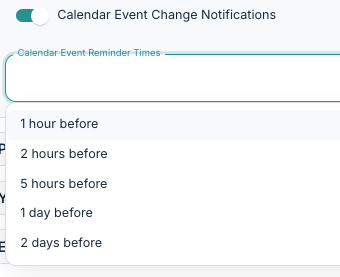
- Calendar event change notifications is the master switch. When off, no create / update / cancel notifications are sent for calendar appointments in the organisation, and reminders are also suppressed.
- Calendar event reminder times allows you to configure reminder points before an appointment. Here you can select from a pre-defined list of reminder times. You can select one or multiple options.
Changing the reminder times rebuilds the pending reminders for every future appointment, so new settings apply to upcoming appointments as well.
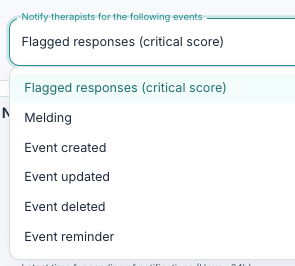
You can also select which reminders will be sent to therapists in your organisation. Under Therapist and Notify therapists for the following events, you will see new options to activate notifications for event creation, updating, deletion and reminders. The same settings configured under Calendar Event Change Notifications apply to the event reminders activated here.
It can be sensible to set defaults within your organisation, and adjust individual preferences rather than turning notifications off entirely, so that important reminders still get through.
The channel used to deliver a notification (in-app, email, SMS or push) is decided per patient based on the patient's notification preferences in their profile, just as with all other notification types.
Was this article helpful?
That’s Great!
Thank you for your feedback
Sorry! We couldn't be helpful
Thank you for your feedback
Feedback sent
We appreciate your effort and will try to fix the article