As a therapist or healthcare professional who leads or participates in group sessions, there are several tools in the calendar that can help with preparing for the sessions, following up patients, and handling digital meetings efficiently.
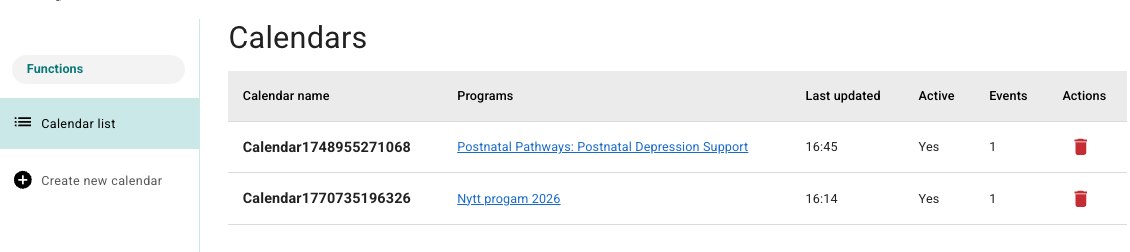
The calendar is found by going to Calendar in the main menu, and then selecting the relevant calendar from the Calendar list:
Video meetings
If an appointment is a video meeting, a button with the text Join call is shown when an appointment in the calendar is opened.
- The button is shown approximately one hour before the meeting starts.
- By using this, you are directed to the digital meeting room via the chosen video provider.

There is also a Copy link button beside which can be used to share the link further with other technicians or practitioners who do not have access to the Youwell platform. The link that is copied here gives equivalent access in the meeting room as the practitioners have.
Details about registered participants
For all appointments (both physical and digital) it is possible to get more information about the participants. When an appointment in the calendar is opened, you will find a Details button.
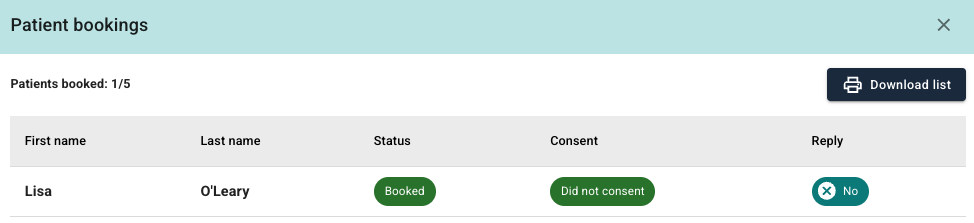
Here it is possible to:
- See the names of patients who have registered.
- Check the status of the registration.
- See if the patient has given consent.
- See answers to any questions from the registration process.
Download participant list
From the same view (Details) it is possible to download a participant list as a PDF via the Download list button. This document contains:
- Name
- Telephone number
- Email address
- Personal identification number
- Answers from the registration form
This printout can be used as a checklist, documentation, or for taking notes during the session.
Was this article helpful?
That’s Great!
Thank you for your feedback
Sorry! We couldn't be helpful
Thank you for your feedback
Feedback sent
We appreciate your effort and will try to fix the article