Patient access log is a tab under Admin that shows who has accessed an individual patient’s record. It is available to you if you have patient administrator access, and it is what you use to answer a patient asking who has seen their information.
Whereas the Audit log starts from a time period, this tab starts from a person: you find the patient first, then see the accesses recorded for them.
Finding the patient
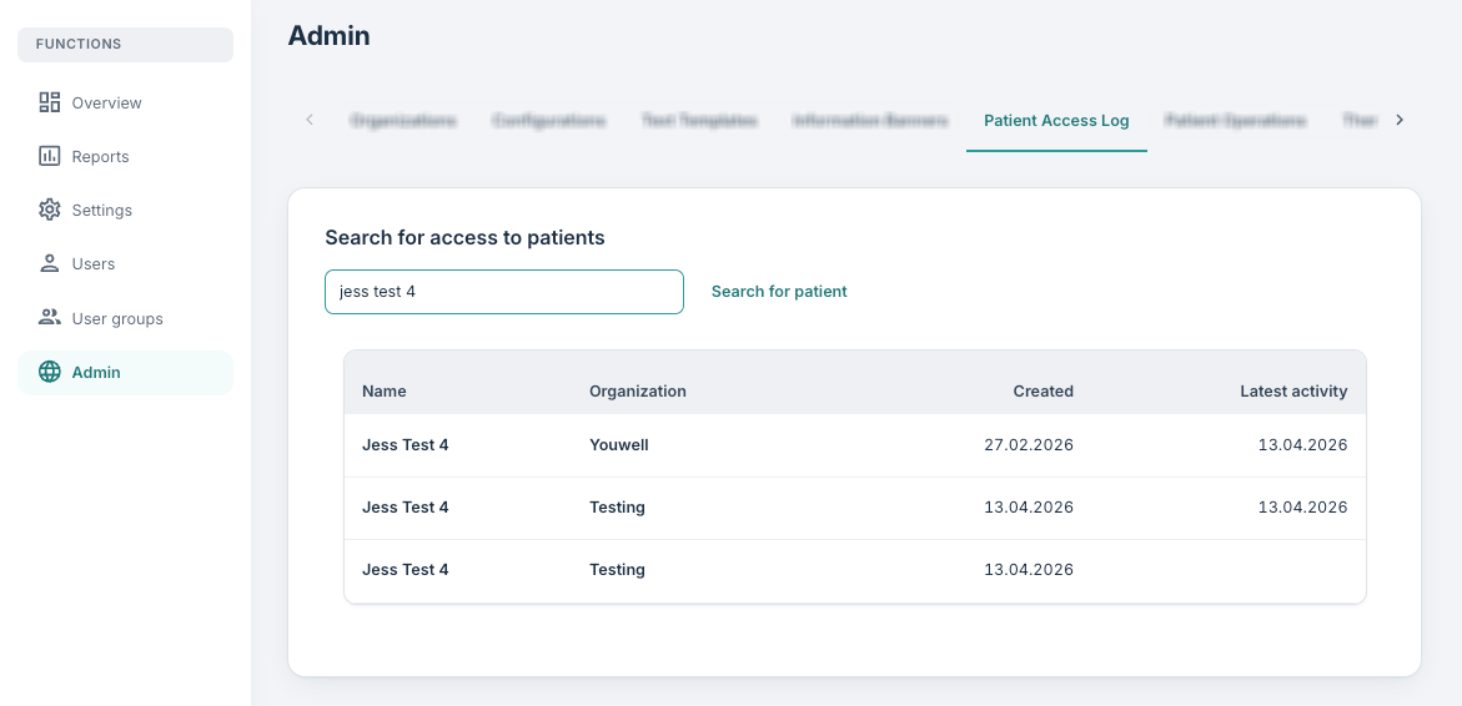
Under Search for access to patients, you can enter a name, national identity number or telephone number and use Search for patient.
Matching patients are listed with Name, Created and Latest activity. If you are a customer administrator working across several organisations, an Organization column is shown as well.
A maximum of 30 results are returned. If you see the message that only the first 30 hits are shown, you should make the search more specific and try again.
Viewing the accesses
Once you have found the patient in question, you can select them from the list. The view changes to Patient access for that patient, with their organisation underneath the name, and lists each recorded access with:
- the name of the user who accessed the record,
- the date of the access,
- the operation carried out, with the number of times it occurred in brackets.
If nothing has been recorded you will see No access records found. Use the cross in the top right to close the patient and return to your search results.
Exporting
Download data exports the access records for the selected patient. This is the file you may wish to use in cases where a patient formally requests a record of who has accessed their information. The export identifies both the patient and the staff who accessed the record, so, as always, we recommend handling it in line with your organisation’s routines for personal data.
Was this article helpful?
That’s Great!
Thank you for your feedback
Sorry! We couldn't be helpful
Thank you for your feedback
Feedback sent
We appreciate your effort and will try to fix the article