Restriction register is a tab under Admin used to block a named clinician from accessing a named patient. It covers situations where a clinician must not see a particular patient’s record, for example, in situations where a clinician and patient are related, or there is another conflict of interest.
If you cannot see the tab
The tab has two requirements beyond ordinary patient administrator access:
- it is only enabled for some organisations, and
- it is only shown when you are signed in with a high-security (level 4) login (typically those who use BankID or MitID).
If you have the right access but the tab is missing, signing in again with a level 4 login is the usual explanation. If it is still missing, the feature is probably not enabled for your organisation.
Reading the register
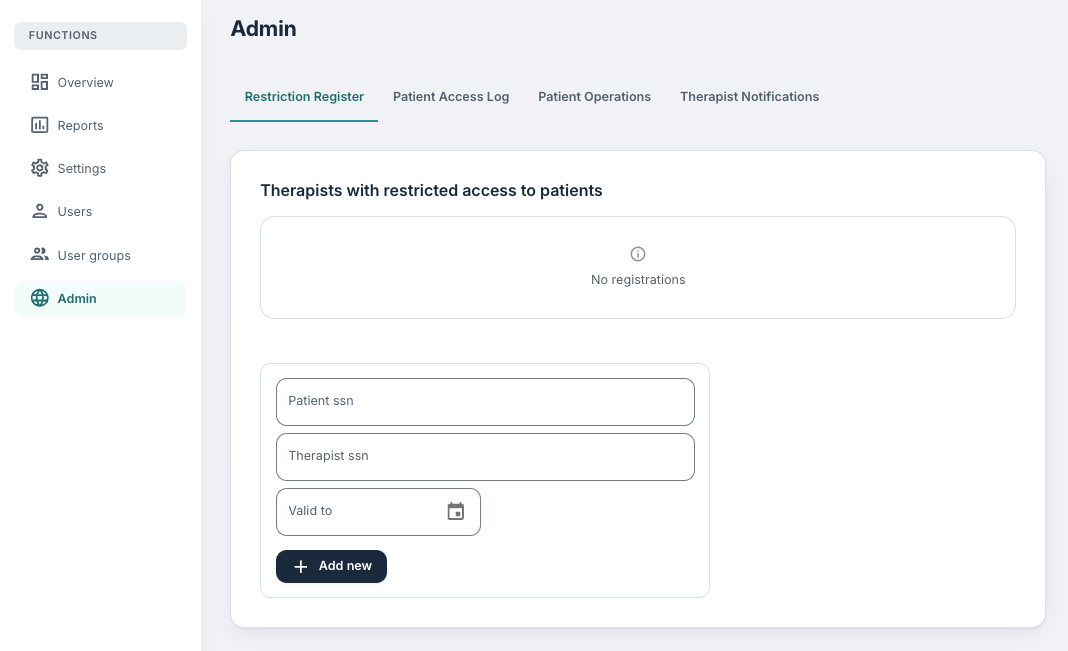
Under Therapists with restricted access to patients, each row displays one restriction, shown as Patient ssn, Therapist ssn and Valid to.
Restrictions that have passed their valid-to date are shown faded and can no longer be removed as they have already stopped applying. Rows showing -- in the Valid to column have no end date and apply indefinitely; these are older registrations, as an end date is now required when adding one.
If nothing has been registered you will see No registrations.
Adding a restriction
You can use the form at the bottom of the page to add a new restriction:
- Patient ssn – the national identity number of the patient to protect.
- Therapist ssn – the national identity number of the clinician to block.
- Valid to – the date the restriction stops applying.
Both identity numbers are validated against the format your organisation is configured to use, so a number that is rejected is usually mistyped rather than unknown. Add new saves the restriction, and it applies from the moment it is saved.
Removing a restriction
Use the remove icon at the end of the row and confirm. You are warned that the clinician will be able to access the patient again, because that is exactly what removal does. If the restriction should end on a known date, you should set Valid to when you create it, rather than relying on someone remembering to remove it manually.
Was this article helpful?
That’s Great!
Thank you for your feedback
Sorry! We couldn't be helpful
Thank you for your feedback
Feedback sent
We appreciate your effort and will try to fix the article