This tab allows export of various registrations from diaries and other health registrations that have been activated on the account and/or the programme. Go to Settings under programme to see which registrations are activated and available to patients.
Note that not all extracts on this page will be relevant for you as they depend on which additional features and tools are activated on the programme. You can read more about registrations here: Program settings: Features & Health registrations.
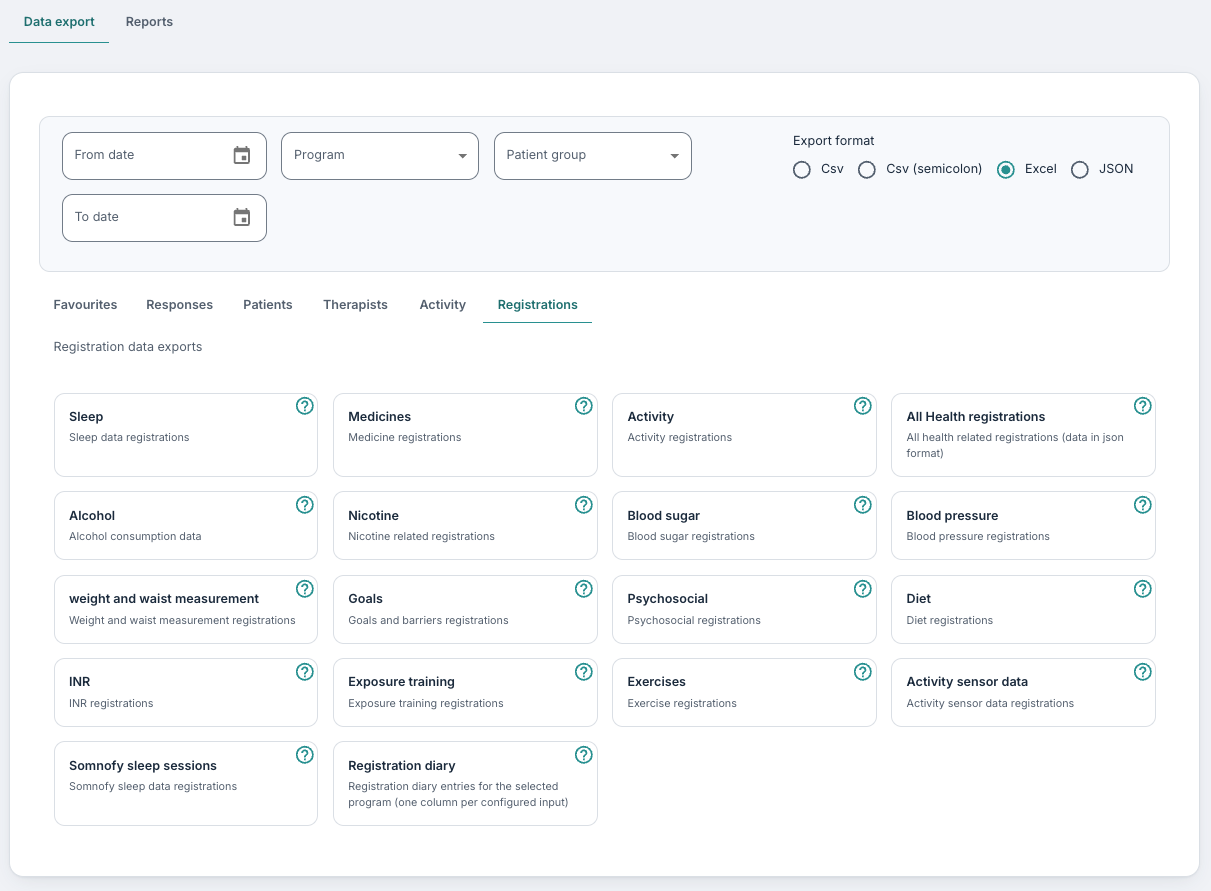
Sleep
This report is only relevant if you use the Sleep diary tool in the programme. You will find the following columns across, with each day/date marked:
- PatientId (The ID of the patient as assigned when the profile was created)
- Date (Date sleep is registered on)
- BedTime (Time for going to bed)
- SleepAttemptTime (Time for attempting to sleep)
- SleepTime (Time the patient fell asleep)
- WakeTime (Time the patient woke up)
- OutOfBedTime (Time they got out of bed)
- SleepOnsetLayency (Time between going to bed and falling asleep)
- SleepOnsetLatencyMinutes (Time between going to bed and falling asleep in minutes)
- TotalSleep (Total sleep)
- TotalSleepInMinutes (Total sleep in minutes)
- TotalBedtime (Total time in bed)
- TotalBedtimeInMinutes (Total time in bed in minutes)
- SleepEfficiency (Calculated sleep efficiency)
- DaytimeNapsCount (Number of naps during the day)
- DaytimeNapsTotalMinutes (Naps during the day in minutes)
- NightWakeupsCount (Number of night awakenings)
- NightWakeupsTotalMinutes (Total time spent on night awakenings in minutes)
- DaytimeActivityRating (Daytime activity rating)
- SleepRating (Sleep rating entered by the patient)
- SleepMedication (Medication the patient has registered in the form)
Medicines
Here it is possible to retrieve the registrations from the Medicine function if this has been activated on the programme. Here you will see:
- PatientId (The ID of the patient concerned)
- Medication (Medication they have entered)
- Strength (Strength of the medication)
- Dosage (Dosage of the medication)
Across, you will then see a list with all dates within the time frame you have set up, where it is clearly indicated whether the medication was taken at the planned time per day or not.
Activity
This report is linked to the Activity function (under Health registrations) and shows:
- PatientId (The ID of the patient concerned)
- Date (Date the activity is registered on)
- Category (Category registered on the activity)
- Activity (Activity entered by the patient)
- DurationInMinutes (Duration of the activity)
- EffortRating (Patient's effort rating)
This is recorded per day.
Combined health registrations
You can retrieve a list of various health registrations, such as alcohol consumption, nicotine, goals and barriers and other functions that have been switched on under Settings on the programme. Here you will see the patient ID of the person concerned, the date they have entered the registration and the type of registration and log. Under Properties you will find the responses and registrations the patient has entered in JSON format.
Alcohol
This report is only relevant for programmes where the Alcohol consumption module is activated. Here you will see an overview of registrations in the alcohol consumption module. The columns are:
- PatientId (The ID of the patient concerned)
- Date (Date of registration)
- Goal-X/Log-X_LogData_Day-X (Goal for alcohol consumption, and what is logged)
Nicotine
This report is only relevant for programmes where the Nicotine module is activated. Here you will see an overview of registrations in the nicotine consumption module. The columns in the report show the patients goals around consumption of nicotine in different formats (e.g. cigarettes, snus, ecigarettes) as well as what the patient has logged in terms of consumption per day in the programme.
Blood sugar
This report is only relevant for programmes where the Blood sugar module is activated. Here you will see an overview of registrations which that patient has inputted via My health. Each field inputted is registered per day within the programme.
Blood pressure
This report is only relevant for programmes where the Blood pressure registration tool is activated. Here you will see an overview of registrations which that patient has inputted via My health. Each field inputted is registered per day within the programme. You will see inputs for morning and evening, as well as averages.
Weight and waist measurement
This report is only relevant for programmes where the Weight and waist measurement module is activated. Here you will see an overview of registrations which that patient has inputted via My health. This includes weight in kilograms and waist measurements in centimetres. Each field inputted is registered per day within the programme.
Goals
This report is only relevant for programmes where the Goals and barriers module is activated. Here you will see an overview of registrations which that patient has inputted via My health, including their goal purpose, any subtasks and obstacles they have identified. Each field inputted is registered per day within the programme.
Psychosocial
This report is only relevant for programmes where the Pyschosocial behaviour tool is activated. Here you will see an overview of registrations which that patient has inputted via My health. This includes what the patient has logged as scores for a range of different emotions, registered per day in the programme.
Diet
This report is only relevant for programmes where the Diet module is activated. Here you will see an overview of registrations which that patient has inputted via My health when it comes to dieting goals. Each field inputted is registered per day within the programme.
INR
This report is only relevant for programmes where the INR registration tool is included. Here you will see an overview of what the patient has inputted under the INR tool in My health. This includes the patients goals, measurement, tablet count, and any additional comments, amongst other things. The report starts with PatientID and then displays values and registrations per patient each day within the programme.
Exposure Training
You can use this export to view patient responses to the My exposures tool if activated on the programme. You will see registrations per PatientId, dates for the registrations and logging on each date, including any inputs for descriptions of the exposure situation, experienced thoughts and security behaviours, as well as experienced resistance.
Exercises
Here it is possible to download general responses from the Exposure training tool if it is activated on the programme. Here you will see registrations per day, including:
- PatientId (The ID of the patient concerned)
- Date (Date the exposure is registered on)
- Status (Status of the exposure – whether planned or completed)
- Score (Score registered by the patient for the exposure)
- Exercise name (Name of the exposure)
- Exercise type (Type of exposure)
- Exercise rating (Rating on exposure)
- Properties (More data; stored in JSON format)
Activity sensor data
This report is only relevant for those use the Sensors tool where health data is collected from wearable Garmin products and integrated in the Youwell platform. The report is first sorted per PatientID, and registrations found here include activity date, steps per day, sleep scores in hours, pulse rate, activity duration and heart rate. Note that these insights are based on data collected and processed by Garmin (via Spike API).
Somnofy sleep sessions
This report is relevant for those using the Somnofy integration, collecting data from Somnofy sleep monitoring devices.
Registration diary
This report populates patient inputs which they have registered via the Registration Diary tool, which you can read more about here: Program Settings: Registration Diary. The export displays dates for registrations and the input fields within the diary setup as column headers.
Was this article helpful?
That’s Great!
Thank you for your feedback
Sorry! We couldn't be helpful
Thank you for your feedback
Feedback sent
We appreciate your effort and will try to fix the article