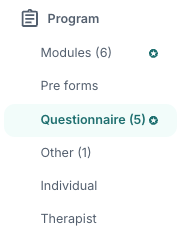
Under Program it is also possible to get an overview of the forms that have been assigned to the patient and their responses. If a blue circle with a star is displayed, this indicates that there are new responses the clinician should take into account.
Pre forms
Pre-forms are forms that are answered before access to the rest of the assigned programme becomes available. This is therefore a type of questionnaire.
Here it is possible to use the function to add a questionnaire to assign new forms, and it is also possible to adjust programme settings and other settings on the question elements in the same way as with a module. See more about this in the article: Patient Page: Program & Modules.
Questionnaires
All questionnaires that are to be answered during the programme period are displayed here. The forms and questions may be available from the start, or added at the time set in the programme profile. The clinician can view all responses by opening the various elements.
If the patient has recently answered a question that has not yet been seen by the clinician, this is indicated with a label in addition to the star that appears in the menu.

This label disappears when the new response is opened. If further follow-up is needed, it is possible to use Follow up (add flag).
In the list of questionnaires it is clearly indicated with a tick (✓) which forms have been answered. The icons displayed on this page indicate the status of each question:
- A green tick shows a form that has been answered
- A grey clipboard icon shows forms that have not been answered
- A red clipboard icon shows forms that have been viewed but not answered and that contain mandatory questions
- A grey page icon shows form packages that contain several forms or questions
The settings for each questionnaire can be adjusted here, and it is also possible to add more questionnaires in the same way as with modules, see the article Patient Page: Program & Modules for more information. It is not possible to change the order of the questions in the same way as with modules.
Adding New Questionnaires
On this page there is functionality for the clinician to assign new forms to the patient. This is often used in situations where the patient has made an incorrect response and they want to assign the form again, or if additional assessment with other forms is considered necessary.
You can use the Add questionnaire-function to assign new forms. It is only possible to select questions from the programme that is assigned to the patient.
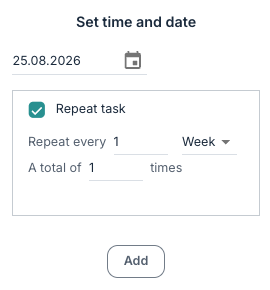
After selecting the questionnaire to be assigned to the patient, you can select when it is due, and whether the task is to be repeated. By using the settings for repetition it is possible to choose the intervals at which the form is shown (day, week or month) and the number of times.
Was this article helpful?
That’s Great!
Thank you for your feedback
Sorry! We couldn't be helpful
Thank you for your feedback
Feedback sent
We appreciate your effort and will try to fix the article